Free Loop Video Maker — No Watermark, One Click, Ready in Seconds
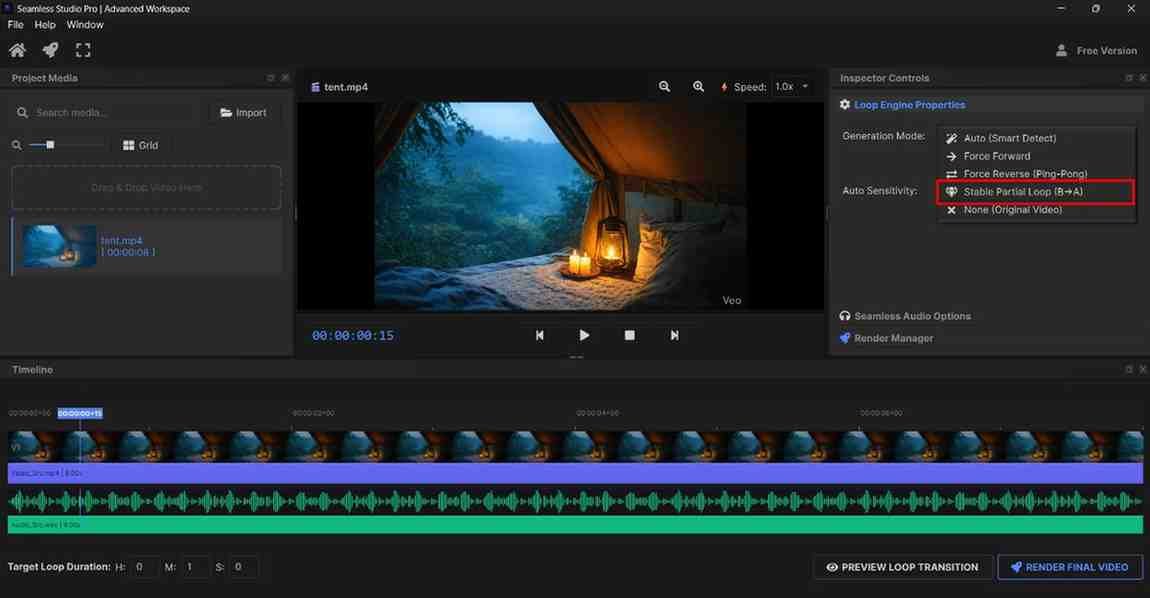
Free Loop Video Maker (No Watermark, One Click Tool)
Every YouTube creator has been there.
You find a perfect 10 second clip — rain hitting a window, a candle flickering, ocean waves rolling in. You know it would make an incredible ambient video. But then comes the headache. Which software do I use? How do I loop it without a jump cut? Will it add a watermark? Do I need to pay?
This post answers all of that. And by the end, you will know exactly where to make your loop videos — free, clean, no watermark, one click.
Why Most Free Tools Fail Loop Video Creators
Let us be honest about the free tools market.
Most free video editors were never built for loop videos. They are built for cutting, trimming, adding effects. Looping is an afterthought. So when you try to create a 10 hour loop in a standard editor, you end up manually copy-pasting your clip hundreds of times, waiting for a painful render, and still ending up with visible jump cuts between each repeat.
Then there are the "free" tools that slap a giant watermark across your entire video. You upload it to YouTube looking unprofessional, viewers notice immediately, and your channel credibility takes a hit before you even get started.
And then there is the third problem — complexity. Tools that require timelines, keyframes, export settings, and codec knowledge are simply not built for creators who just want a clean looping video fast.
That is exactly the gap a dedicated free loop video maker fills.
What Makes a Good Free Loop Video Maker
Not all loop tools are equal. Here is what actually matters:
No watermark — Your video should look 100% yours. No branding from the tool, no logos, no overlays. A watermark instantly signals amateur content and hurts your YouTube channel brand.
Seamless output — The loop must be invisible. No jump, no stutter, no flash between repeats. This is the technical core of any loop video tool and the single most important quality factor.
One click simplicity — Upload, select duration, generate. That is the entire workflow. Anything more complicated is wasting your time.
Multiple duration options — A good tool gives you flexibility. 1 hour, 3 hours, 10 hours, 24 hours. Different content needs different lengths.
Fast processing — You should not wait 30 minutes for a tool to generate your video. Modern loop generators process your file in under a minute regardless of output duration.
Who Is This Tool Built For
This free loop video maker is built specifically for three audiences:
YouTube Ambient Creators — If you run a channel focused on sleep sounds, study music, nature ambiance, lo-fi beats, or white noise, this tool is your secret weapon. Upload a short clip, extend it to 10 hours, publish. That single video can generate watch time and ad revenue for years.
Meditation and Wellness Channel Owners — Guided meditation backgrounds, breathing exercise loops, chakra frequency videos, calm nature scenes — all of these require seamless, uninterrupted loops. A jump cut in a meditation video completely destroys the experience for the viewer. Seamless looping is non-negotiable in this niche.
Background and Music Video Creators — Lo-fi music producers, chill hop channels, gaming background video makers, and visualizer creators all need looped visuals that run for the length of their audio. This tool handles that perfectly with zero fuss.
How to Use the Free Loop Video Maker (Step by Step)
The entire process takes under 60 seconds:
Step 1: Prepare your clip Find or record a short video between 3 and 60 seconds. Nature footage, abstract visuals, slow motion clips, and music visualizers all work beautifully.
Step 2: Upload your video Drag and drop your clip into the tool. No account needed to get started.
Step 3: Choose your loop duration Select from 1 hour, 3 hours, 10 hours, or 24 hours depending on your YouTube strategy.
Step 4: Generate your seamless loop Click once. The tool detects loop points automatically, removes jump cuts, and builds your extended video as a single clean file.
Step 5: Download — no watermark Your finished video downloads completely clean. No logo. No overlay. No watermark. Ready to upload directly to YouTube.
The YouTube Strategy Behind Loop Videos
Here is something most creators do not realize until they see it working on their own channel.
Loop videos are evergreen content. A 10 hour rain sounds video you upload today will still be getting views two years from now. People search for this content every single day — before bed, during study sessions, at work, during meditation. The demand never stops.
YouTube's algorithm measures watch time heavily. When someone plays your 10 hour ambient video and leaves it running while they sleep, that is potentially 8 hours of watch time from a single view. Compare that to a 10 minute vlog where the average viewer watches maybe 4 minutes.
Loop video channels regularly hit monetization thresholds faster than traditional content channels — because watch time accumulates rapidly even with a small subscriber count.
The creators who figured this out early are now sitting on catalogs of 20, 30, 50 loop videos quietly generating passive income every month. The barrier to entry is a free tool and a short video clip.
Start Making Your First Loop Video Right Now
No watermark. No editing experience required. No complicated software. Just one click between your 5 second clip and a 10 hour YouTube-ready video.
👉 Try the Free Loop Video Maker Now — No Watermark — your first seamless loop video is one click away.
Frequently Asked Questions
Is this loop video maker really free with no watermark?
Yes. You can create and download your seamless loop video completely free with no watermark added to your footage. Your video will look entirely professional and brand-free, ready to publish on YouTube or any other platform.
How long can I make my loop video?
You can extend your short clip into loops of 1 hour, 3 hours, 10 hours, or 24 hours. Whether you are making a quick background video or a full overnight sleep sounds video for YouTube, the duration options cover every use case.
Will there be a jump cut between each loop?
No. This is the core feature of the tool. It automatically creates a seamless connection between each repeat of your clip so the transition is completely invisible to the viewer. No jump, no flash, no stutter — just one continuous smooth video.
What types of videos work best for looping?
The best clips for seamless looping are nature footage like rain, fire, ocean, or wind, abstract visuals like smoke or flowing water, slow motion clips, music visualizers, and ambient screen recordings. Avoid clips with sudden movements, dialogue, or rapidly changing lighting as these make the loop more noticeable.
Can I upload the output video directly to YouTube?
Absolutely. The generated video file is fully YouTube-compatible. Simply download it, add your thumbnail and SEO-optimized title, and upload. Many creators in the meditation, sleep, and ambient music niches use this exact workflow to build passive income channels with minimal effort.